Previous: Post Installation Next: Update the List
Step 5 - Launch the Game
How to launch the game:
- In MO2, select the profile you want to play from the Profile menu in the top-left corner.
- In the executable menu next to Run, choose that profile’s Windowed or Fullscreen option. MO2 displays only these two executables for the selected profile.
- Click Run.
Windowed is the default. To make MO2 select Fullscreen automatically when you switch to a profile, open Tools > Profile Executable Selector, find that profile, and set Auto-Select to its Fullscreen executable.
The screenshots on this page show an older executable label. In the current list, choose Windowed or Fullscreen for your selected profile.

Selecting an Alternate Profile
Select the other profile from the Profile menu, then choose its Windowed or Fullscreen executable and click Run. In the Option Mods area, you can pick a ReShade or font option. ENBs are no longer included; see Optional Mods if you want to add one yourself. Other options may be specific to the main Fashionista profile, so check that page before enabling them.
Things to know before you start
- This game is buggy, You NEED to save and close the game and reopen it every hour or 2.
- Use the Windowed or Fullscreen executable shown for your selected profile so the correct overhaul launches.
- Your saves are in MO2’s left panel under
#Overrides - For the LOVE OF GOD DONT FUCKING TOUCH THIS>{profile name} Override. See Updating the List for backup steps.
Creating a desktop shortcut
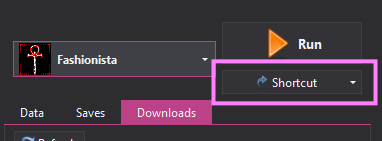
Select the profile and its Windowed or Fullscreen executable first. Click Shortcut, then Desktop to create a shortcut for that choice.
Launch through Steam
For the Steam version of Fashionista, you can use Steam’s Play button to start the MO2 executable for your selected profile. This may let Steam track play time and apply your Steam controller setup.
- In MO2, choose your profile and its Windowed or Fullscreen executable, then create a desktop shortcut using the steps above.
- Check the shortcut’s target for the executable name after
moshortcut://:. Use that exact name in the Steam launch option. -
In Steam, right-click Vampire: The Masquerade - Bloodlines, open Properties > General, and enter a launch option like this, replacing the MO2 path and executable name with yours:
"C:\Modding\Fashionista\ModOrganizer.exe" "moshortcut://:Fashionista Windowed" %command% - Start Bloodlines from Steam. If you change profiles or display mode, update the executable name in the launch option to match the new MO2 shortcut.
If Steam no longer launches the list correctly, remove the custom launch option and start the game from MO2.