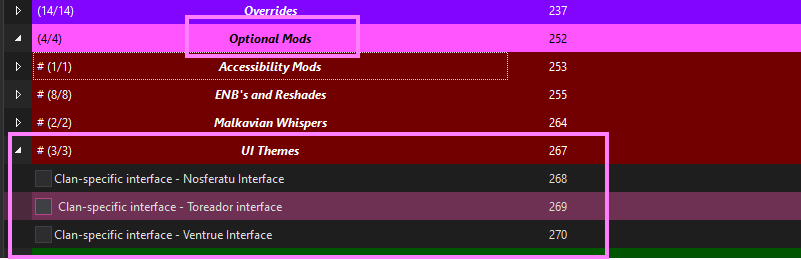
Optional Mods
The Game is a bit finicky when it comes to stacking overhauls and if you enable other profiles, the game will break or not even launch.
The Only extra mods you can enable on a profile are the ones in the Fashion, Optional Mods, and in some Cases in the Overhauls > {Profile Name} > {Profile Name} - Option Mods folders.
This should walk you through the various options for the optional mods, I have tried to include almost all the outfits, overhauls and optional mods that are avaible and work for the game.
I have tried to make all the optional mods work for all profiles but the overhaul specific ones will NOT work on other profiles and due to the way that some Profiles are built (such as some profiles having non-standard clans), some of the optional mods will not work on every profile.
Fashion
This is where you will find all the alternative outfits for the list.
They are broken up by clan and gender (this game was released in 2004).
This game has the option for your character to have 5 different outfits (one starting outfit and four additional ones) and you unlock them by buying them or playing the game. There is no way to have more then the 4 additional outfits.
The mods in each area have a note that has information on what they cover; armor 0-4, HUD and hands.
- Armor: 0 is your starting outfit.
- Armor: 1-4 are the other 4 outfits in the game.
- HUD: means that the UI will be updated so that the outfit looks the same as the item your character is wearing.
- Hands: means that there is custom Hands for the first person view of the character.
I have enabled my preferred defaults for the Fashionista profile, but feel free to take a look at the Fashion page to take a look at most of the outfits that are in the list. I have not updated a fair number of them due to time but I will get to them all eventually.
You can only have 1 (one) outfit for each slot, some of the mods only cover some of the slots, so you can mix and match a bit. If you enable more the one mod that covers a slot, the lower on the list or higher in priority will overwrite the other mods, so enabling all the outfits will just make the last outfits load.
Overhauls
Some of the overhauls come with multiple options (selectable during installation), I have broken these out into their own mods so you can enable them if you wish.
These Mods ONLY work per-profile and if you enable one that is, for example, inteneded for Bloodlines Extreme it will NOT work for the Fashionista profile.
You find these mods in Overhauls > Overhauls Name > Overhauls Name - Optional Mods
I have enabled the recommended ones for each overhaul or what my preference is, but feel free to enable what you want.
Optional Mods Seperator
This will cover all the sub-folders in this area.
Audio Options
Optional music HUSHED
Makes some of the optional music in the Unofficial Patch lower volume so its not so deafening. Disable to get the original volume back if it’s too low for you.
Blade - New Order Confusion Music for Asylum
Optional music for the asylum, I like this but disable it to get the original music back.
Accessibility Mods
Set Malkavians Font to Standard Font
The Malkavians use some pretty wild and crazy looking fonts that can be hard (or even impossible) for some people to read.
I really like the effect but I’ve included this mod as an option for people who want to remove it.
Enable the following mod to set the font to the default one that all the other clans use:

ReShade and ENB
ReShade options are in Optional Mods > Reshades. Disable one preset before enabling another.
| Feature | Keybind | Description |
|---|---|---|
| ReShade Effects | Ctrl + F12 | Toggle all ReShade effects on/off |
| ReShade Overlay | Ctrl + F11 | Toggle ReShade configuration overlay |
ENBs are no longer included with Fashionista because I do not want to redistribute those files. If you want to use one, download it from its original mod page and add it to your own installation.
Add Dev0lved ENB yourself
- Download the Dev0lved ENB archive from its Nexus Mods files page.
- In MO2, install the archive as a new mod. If MO2 shows an installation tutorial, select Exit Tutorial.
- In MO2’s installation dialog, right-click the top-level
unofficial_patchfolder and create a directory namedRootinside it. - Select every other file and folder in
unofficial_patchand move them intoRoot. TheRootfolder should now contain the ENB files, includingd3d9.dllandenbseries.ini. - Continue past MO2’s folder-structure warning and complete the installation.
- Move the new mod under Optional Mods > Reshades in MO2’s left panel and enable it.
- Launch the game through MO2. An ENB notification in the game window confirms that it loaded.
Keep any other ENB disabled while testing this one. Because this is a user-added mod, include it in the changes you report when asking for support.
Malkavian Whispers
Malkavian Whispers UPgraded
This mod adds a chance to play Malkavian whispers on all maps in the game. This changes the same files as the Uninterrupted background music mod and should only be selected if you’re playing a Malkavian, so it’s disabled by default.
The Upgraded version was made by Svarttjern and I would like to thank them for it.
Uninterrupted background music
This mod attempts to fix the background music not looping when you open menus.
You can only have one of these enabled at a time, they both edit the same thing.
UI Themes
This is a group of UI overhauls based on specific clans. They’re a nice touch if you’re playing one of the clans, so I do suggest them. But keep in mind that some of the overhauls have custom themes, so enabling them can cause things to look odd for any profile that is not Fashionista or Unofficial Patch.